
My Personal Guide for Developing Software with AI Assistance - 2026 Edition
What's Changed Since 2024
So back in May of 2024 I wrote the first version of this little guide, at a time when agents were absolute crap and Wilmer was still in a state that couldn't even be called v0.01. Back then it got a fair bit of interest in various forums since there simply weren't a lot of resources like that.
Some variation of that workflow is what I used for years. Until September 2025, to be exact.
Enter Claude Code. I decided to give it a try because my old workflow simply took too much energy for what I could handle after work, and I was really starting to hear good things about these agents.
It's safe to say: Claude Code has won me over.
How I Code Today
I don't "Vibe Code" in the sense that most people think of it. The concept of Vibe Coding is essentially handing all of the labor to the agent; your job is to describe the product specification, to give some general constraints and guidance, but otherwise you let the LLM do what it does best.
Unfortunately, so far that has had some pretty catastrophic results for many companies.
Instead, I find that it's better to treat Claude Code as if it were a junior developer. I handle all the architecting, planning and design up front. Designing every single bit of the app, end to end. Researching deeply every tool, library, design pattern, crafting the code quality gates and all the rules it has to follow, specifying all of the naming conventions to adhere to, etc
This can take days. Maybe even weeks, depending on the scope of the project. But after that? I can let Claude Code just run wild. There's no more room for it to mess up; no creative expression available.
Understanding The Process
First, coding with an agent is completely different than doing standard development. You are, essentially, acting as a team lead for a robot that is about equivalent to a competent junior dev (who can type faster than you can think lol). It is your job to direct that dev in such a way that they build something amazing.
I've built several personal apps this way, and honestly it's so much fun.
Step 1: Architect and Deep Research Everything
Claude, Gemini, ChatGPT, etc all suffer from the same two core problems when it comes to Software Architecture:
- hallucinations
- outdated information that they don't realize is outdated, because LLMs struggle with a sense of time.
This is where your personal knowledge, and Deep Research, come in.
First you want to lay out what you expect. What tools and languages will you be building this in? What design patterns do you want it to use? What folder structure? What constraints do you have?
Once you start to come to a consensus with the AI on these things, stop everything and ask it for a series of deep research prompts. Ask it to write the prompts looking to validate the information and designs so far, including having it check developer opinions on those solutions via blog posts, forum posts, etc.
For each prompt you're given: open a new window, select the Research/Deep Research option, and give it the prompt.
After the deep research finishes, I generally copy the result and take it back to the original chat window. I'll paste it like this:
Below is the result of the deep research prompt

<research_1>
// words words words
</research_1>

Please use this and reconsider the above recommendations.
This almost always results in it catching its own hallucinations, in it realizing something is out of date or there's a better way, etc. This means that not only do you clean up the designs, but you also get a chance to learn some new stuff.
As always: follow through to the sources if the information is new to you.
Read the Sources
When you're reading the deep research, look at how it came to some conclusions. Even with DR, I've seen it make pretty big mistakes, misinterpreting something to mean something else. You have to be careful. Make sure you understand what the Deep Research is saying before you give it to the LLM.
Step 2: Generate Architectural Documents
Once I've done the deep research on the relevant topics, and explained/had it copy down all of my architectural goals, constraints, etc, then I work with the AI to generate the actual architectural documents. These documents cover everything we've made decisions on: design patterns, security constraints, how components interact, data flow, the whole picture.
Next, I review the documents for gaps. This is where I bring in a second LLM to assist me; at this point we've done what I think is best and what my first LLM thinks is best, so lets get a third set of eyes on this problem.
I ask the second LLM to do code reviews, security reviews, and general architecture reviews. I tell it to deep dive; do multiple web searches, run deep research prompts, etc to validate findings. If there is any ambiguity, I want it researching.
When the second LLM finds issues, it comes back to me and we talk through them. Once I'm happy, we apply the changes. This back and forth continues until the architecture is solid.
This step is critical. A lot of teams skip it, which likely contributed to the "95% of AI ventures fail" stat.
You see it all the time, developers complaining about unmaintainable software that was vibe-coded, falling apart at the seams with tons of critical bugs and security issues. The reality is that the same thing would happen if you just tasked a pile of fresh entry-level junior devs to write a complex system, too. You have to think like a team lead and give them what they need to succeed in spite of that.
Step 3: Break the Architecture Into Modules
Once the architecture is solid, I break it apart into logical chunks. These modules include things like:
- Security
- Database
- Front End (including folder structure)
- Backend (including projects and folder structure)
- Infrastructure
- Integrations
Each module gets its own documentation. This makes it easier to reason about each piece independently, and it makes the development plan cleaner.
Step 4: Create the Development Plan
This is where I have the AI break everything up to this point into a concrete development plan. We've made the decisions; we've left little to the imagination. But getting it documented like this, as opposed to having the LLM just work off the architectural docs, gives me a chance to manage the order it works on things to ensure maximum testing and quality, and one final peek over everything to make sure none of our plans were lost in translation.
The development plan always follows the same structure, each of which gets their own documents:
- Step 1 is pre-prep. This step is all me. I do anything that needs to happen before the AI can start coding. This includes creating the project in my IDE to ensure everything is set up correctly, setting up a local git init if I decide to do a separate local repo for a staggered-staging, getting directories and permissions set up, installing any apps we need, etc. Usually 1 MD file for this.
- Step 2 is tool verification. The LLM tests all the tools it needs to make sure it's ready to use them. If it needs to run dotnet commands, it tests that. If it needs to run docker, it tests that. We catch issues early before they become blockers, and it gives me a chance to update the settings.json if permissions are out of whack. Usually 1 MD file for this.
- Step 3 and beyond is where the coding happens. Each step after this is building the application, one logical module at a time, with code quality gates before each commit. N number of MD files here; bigger projects can hit 14+ files.
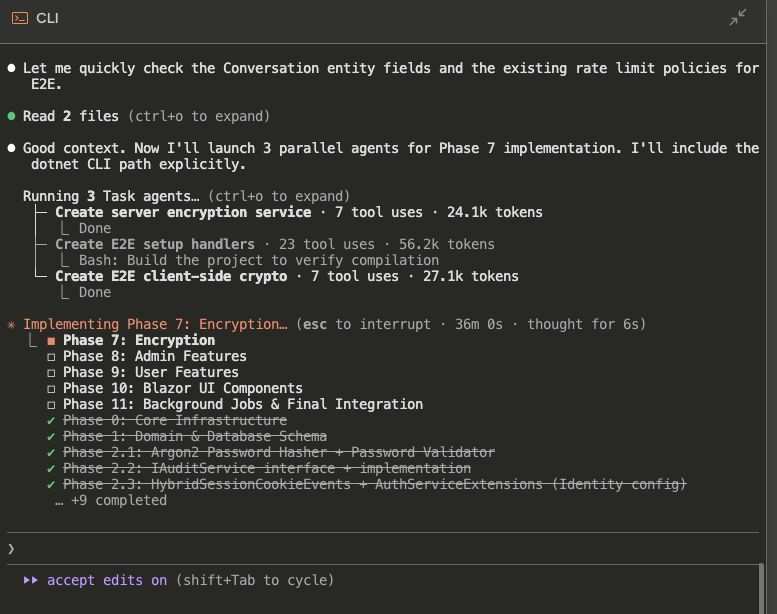
An example from a little personal project I'm working on during the weekends:
Defining the Code Quality Gates
First- I specify ALL conventions in this plan. Naming conventions, style conventions, even down to XML docs and comment conventions. Nothing is left to chance.
After that, I tell the AI exactly what quality checks must pass before any code gets committed. I don't leave this vague. I spell it out.
For example, here is what I currently have set up for a personal .NET core 10, C# backend based personal chat app I'm tinkering with:
- Build -- dotnet build must produce zero warnings on production projects. This single command runs NuGet Audit (dependency vulnerabilities), all five Roslyn analyzer packages (SonarAnalyzer, StyleCop, Roslynator, Meziantou, BannedApiAnalyzers), and .editorconfig style enforcement because TreatWarningsAsErrors is on and EnforceCodeStyleInBuild is true.
- Test -- dotnet test --collect:"XPlat Code Coverage" must pass all tests with at least 80% line coverage on changed code.
Mutation test -- Stryker.NET with --since main must stay above the break threshold (40). This catches tests that have coverage but don't actually assert meaningful behavior. - ReSharper CLI -- inspectcode.sh must produce zero errors and zero warnings on production code. Suggestions/hints are informational only.
- SonarQube -- Scanner with /p:SonarQubeAnalysis=true on the build step. Quality gate must pass: zero new bugs, zero new vulnerabilities, zero unreviewed security hotspots, 80%+ coverage on new code, under 3% duplication.
- Gitleaks -- gitleaks git --source . --staged --verbose must produce zero findings.
- DRY verification -- Manual pass looking for duplicated logic, repeated string literals, copy-pasted blocks across modified files and their neighbors.
- XML doc compliance -- Any file touched must have its XML docs brought into the concise style (one-sentence summaries, third person, no filler).
- Comment cleanup -- No commented-out code, no what-comments, no emojis in any touched file.
Steps 1-6 are tool-enforced gates. Steps 7-9 are discipline checks that happen during the work but get verified before commit. If any step fails, fix and re-run from that step. No skipping, no deferring.
Building and Reviewing
Once I have the full plan laid out, I let the bots run wild. They build one module at a time, running the quality gates before each commit.
For me, a smaller project can take a few hours, and burn through my hourly 5x Max usage a few times. I always use Opus 4.5 for it, but it's worth the wait for that quality.
After the AI thinks a module is complete, it is required to spin up a separate agent specifically to do a code review end to end. This agent checks that nothing was missed, no gaps exist, and that everything matches the architecture. The agent leaves me a SignOff.md file confirming it checked everything.
Then I come in for my own code review.
You, like any senior dev or team lead or dev manager, are responsible for the code you commit. When a bug hits production, the agent didn't fail. You failed. This part takes time, and it can be grueling, but with a bit of patience and the help of some AI chatbots, you can get through this alright. Take your time.
Among other things, you're looking for:
- Obvious failings to meet the specs of your architecture
- Security flaws
- Really bad or inefficient code. Did it create unnecessary loops? Tons of duplication? Did something that just doesn't make sense? Your job is to find that, and call it out.
Once I've identified the issues, I then get them documented into a new .md file, and send the agent back to work.
I generally keep looping like this until I have a good, working feature or project.
SAVE YOUR PROMPTS
I reuse prompts a lot, so I generally try to save as many as I can. That includes things like the description of what I want from the project, my requirements or constraints. My personal goals or external factors. Anything like that.
Generally, when I have a question of another LLM, that lets me do something like this:
Consider the below project description:
<description>

</description>

And here are some of the features I'm aiming to achieve:
<features>

</features>

What I'd like to do is...
Keeping those blocks, so that you can re-use them in new prompts, helps so much. I save tons of time with it.
My settings.json File
This file you'll find in .claude (on the Mac), and it's where you can set the approve, deny or ask permission, as well as special sandbox domains. I lock this bad boy down. I generally will designate a folder that the agent can do whatever it needs to in, but otherwise will block it from the rest of the computer. I'll let it do websearches or fetches, and let it curl GETs, but no PUT/PUSH/DELETE on anything except localhost. A lot of constraints around git and other stuff, too.
My Project Specific CLAUDE.md File
Rather than filling the project CLAUDE.md file with a ton of stuff that will cause the agent to churns through tokens quickly even when it doesn't need that info, I'll instead use it as an index for where the instructions actually live- other files.
These instruction files generally involve things like giving it strict rules that all code quality checks must pass before each commit, and what those quality checks are. Or specifying that it shouldn't try to do certain bash calls, because it runs afoul of my CLAUDE settings file and would trigger me to have to respond to a permission prompt.
Usually I'll end up with several files for backend coding, and several for frontend coding.
Understand What It's Telling You
If you have to deploy, take care when trusting the LLM's instructions if it helps you. It will probably be wrong in a lot of what it tells you. Just accept that. Constantly remind yourself: "What it tells me is going to be wrong". Challenge everything. Either hunt down someone that can help you (ideally), go learn how yourself (also ideally), or at the minimum do Deep Researches like your life depends on it.
But seriously: Watch tutorials. Read guides. LEARN.
Don't do things you don't understand. That's how people lose money.
The End?
That's pretty much it. It's a lot of work, and it's definitely not 10x productivity, but I get so much better results than just having unmanaged agents writing my code.
One day this might change. 2 years ago I said I'd never use agents. Here I am. 2 years from now I may say "I don't need to do this anymore; it now handles architecture as well as I do from day 1". That's fine, too.
But for right now, as developers, quality is our job and our goal. Using AI is amazing for development, and definitely speeds things up, but we have to make sure to use it responsibly and focus on quality, security and reliability above all.
I will always push back when I need to if someone is pressing me to "go faster". Gabe Newell paraphrased a decades old quote quite well: "Late is just for a little while. Suck is forever." They won't remember that I gave in to the pressure and rushed to meet their deadline; they'll remember that I delivered them unusable crap.